How to Download Pinterest Videos: 7 Easy Methods for 2026 (Desktop & Mobile)
 2026.04.23 07:01
 YT.Shi
Pinterest is a visual discovery engine packed with creative ideas, DIY tutorials, and inspiring video content. However, Pinterest does not provide a straightforward "Download" button for every video you see. This limitation can be frustrating if you want to save a recipe clip for the kitchen or store a workout routine for offline use. This guide walks you through the exact mechanism behind Pinterest video saving and details seven reliable methods to download your favorite content safely in 2026.
Why People Download Pinterest Videos
People download videos from Pinterest for several practical and intentional reasons, each serving distinct personal or professional needs.
Offline Viewing for Tutorials and Guides
Many users download Pinterest videos to access step-by-step tutorials, DIY instructions, and helpful guides while traveling, commuting, or in areas with limited or no Wi-Fi. Having content saved locally ensures they can follow along without interruptions or relying on a stable internet connection.
Building a Personal Creative Asset Library
Pinterest is a major source of visual inspiration, so users often download videos to build a private, organized collection of creative assets. These videos serve as design references, style inspiration, mood board material, or content ideas for personal projects, art, crafting, and content creation.
Securing Content Against Loss or Changes
Content backup is a key concern for regular Pinterest users. Creators may delete original pins, update videos, or set their boards to private over time. Downloading videos ensures users retain access to valuable content permanently, avoiding accidental loss of saved material.
Research and Team Collaboration for Marketers
Marketers, social media managers, and researchers frequently download Pinterest videos to analyze visual trends, campaign styles, and audience preferences. Downloaded content also makes it easy to share references with team members or clients who do not use Pinterest, enabling smoother collaboration without account barriers.
How Pinterest Video Downloading Actually Works
Saving a pin to your board only stores a bookmark on Pinterest servers. It does not save the video file to your device.
Saving is not downloading
Saved videos stay on Pinterest servers. They require an internet connection to play and are not available offline.
Platform restrictions on direct downloads
Pinterest limits direct video downloads to protect creator intellectual property. Standard right click save options are disabled on the web. Official in app downloads only appear when creators allow them.
How download tools work
Third party tools extract the original video URL from public page data. They do not hack or alter Pinterest. They simply locate the hidden video file for personal use.
How to Download Pinterest Videos: 7 Effective Methods
Method 1: Official Pinterest App Direct Download
This is the safest and most recommended method for mobile users. Please note that this feature is only available if the original creator has enabled downloads for that specific pin.
Steps:
1. Open the Pinterest app on your Android or iPhone.
2. Navigate to the video pin you want to save.
3. Tap the three dot menu icon located in the top right or bottom right corner of the screen.
4. Look for the "Download video" option in the pop up menu.
5. Tap "Download video." The file will be saved directly to your device camera roll or gallery.
Important: Videos saved this way usually contain a small Pinterest watermark and a link back to the creator profile.
Method 2: Online Video Downloader Websites
If the official app option is missing or you are on a desktop computer, online downloader sites are the most universal solution. These tools extract the video file from the pin link without requiring software installation.
Steps:
1. Copy the link of the Pinterest video. On the Pinterest app, tap the share icon and select "Copy Link." On a computer browser, open the pin and copy the URL from the address bar.
2. Open a new browser tab and visit a trusted online tool such as SavePin.app, SavePinMedia, or KlickPin.
3. Paste the copied link into the text box on the website.
4. Select your desired video resolution if options are provided (e.g., HD or Standard).
5. Click the "Download" button. The video will begin saving to your default downloads folder.
Safety Tip: Only use websites with "HTTPS" in the URL. Avoid any site that asks you to log in to your Pinterest account or complete a suspicious survey.
Method 3: Browser Extensions for One Click Saving
For those who save Pinterest content frequently, a browser extension adds a download button directly to the Pinterest interface.
Steps for Chrome or Firefox:
1. Go to the Chrome Web Store or Firefox Browser Add Ons page.
2. Search for a dedicated Pinterest video downloader extension. Effective options in 2026 include PinSnap (Firefox), Pinterest Video Downloader, or Futoo.
3. Click "Add to Browser" or "Install."
4. Once installed, refresh your Pinterest feed page.
5. You will now see a small download icon overlay on video pins or a new button near the pin description. Click this icon to save the video instantly without opening a new website.
Note: If Pinterest updates its website layout, extensions may temporarily stop working until the developer releases an update.
Method 4: Mobile Specific Downloader Apps
Instead of using a mobile browser website every time, you can install a dedicated app that integrates a download manager and web browser.
Android Steps:
1. Open the Google Play Store and search for Unisaver or a similar high rated video saver for Pinterest.
2. Install the app and open it.
3. The app usually opens a built in Pinterest browser. Log in to your Pinterest account within the app interface.
4. Navigate to the video you want. The app will automatically detect the video file.
5. Tap the floating download button to save the file to your Android Gallery.
iPhone Steps:
1. Open the App Store and download PinGriv or an equivalent Pinterest saver tool.
2. Follow the in app instructions to paste a link or browse within the app.
3. Ensure you review the app privacy label to confirm it does not collect unnecessary personal data.
Method 5: Screen Recording (The Ultimate Backup)
When a video is embedded in a way that blocks all third party downloaders, screen recording is the foolproof fallback method. This captures exactly what you see on screen.
Desktop Recording (Windows/Mac):
1. Navigate to the Pinterest video and make it full screen.
2. Windows: Press Windows Key + Alt + R to start Xbox Game Bar recording.
3. Mac: Press Shift + Command + 5 and select "Record Entire Screen" or "Record Selected Portion."
4. Play the video from start to finish and stop the recording.
Mobile Recording:
1. Swipe down to access your Quick Settings panel (Android) or Control Center (iPhone).
2. Tap the "Screen Record" button. If it is not visible, add it in your device settings.
3. Navigate to the Pinterest app and play the video.
4. Stop the recording. The video will save to your photos.
Limitation: This method records the display output, so video quality depends on your screen resolution and internet speed during playback.
Method 6: Command Line Tools and APIs
This method is intended for developers or advanced users who need to extract video data or download in bulk without a graphical interface.
Using Lux:
1. Install Lux on your computer via terminal or command prompt (requires basic coding environment setup).
2. Copy the Pinterest video URL.
3. Type lux "URL" in the command line and press Enter.
4. The tool will scrape the highest quality source file available and save it to the current directory.
Using Apify Pinterest Actor:
1. Visit the Apify platform and search for the "Pinterest Video Downloader" Actor.
2. Input the pin URL into the Actor input field.
3. Run the Actor to return structured data (JSON format) including the direct MP4 link.
Method 7: BitBrowser for Multi Account Management and Downloading
Many Pinterest users manage multiple accounts for different niches, such as a personal inspiration board and a separate business or brand account. Logging into all these accounts in the same Chrome browser window can trigger Pinterest security alerts or cause account linking.
How BitBrowser Helps:
BitBrowser is a privacy focused antidetect browser that creates separate, isolated environments for each Pinterest account. Each profile has a unique digital fingerprint, making it appear as a completely different device to Pinterest servers.
Steps for Safe Downloading with Multiple Accounts:
1. Download and install BitBrowser from the official website. The free plan includes up to 10 browser profiles.
2. Open BitBrowser and click "Add" Give the profile a name like "Pinterest Personal."
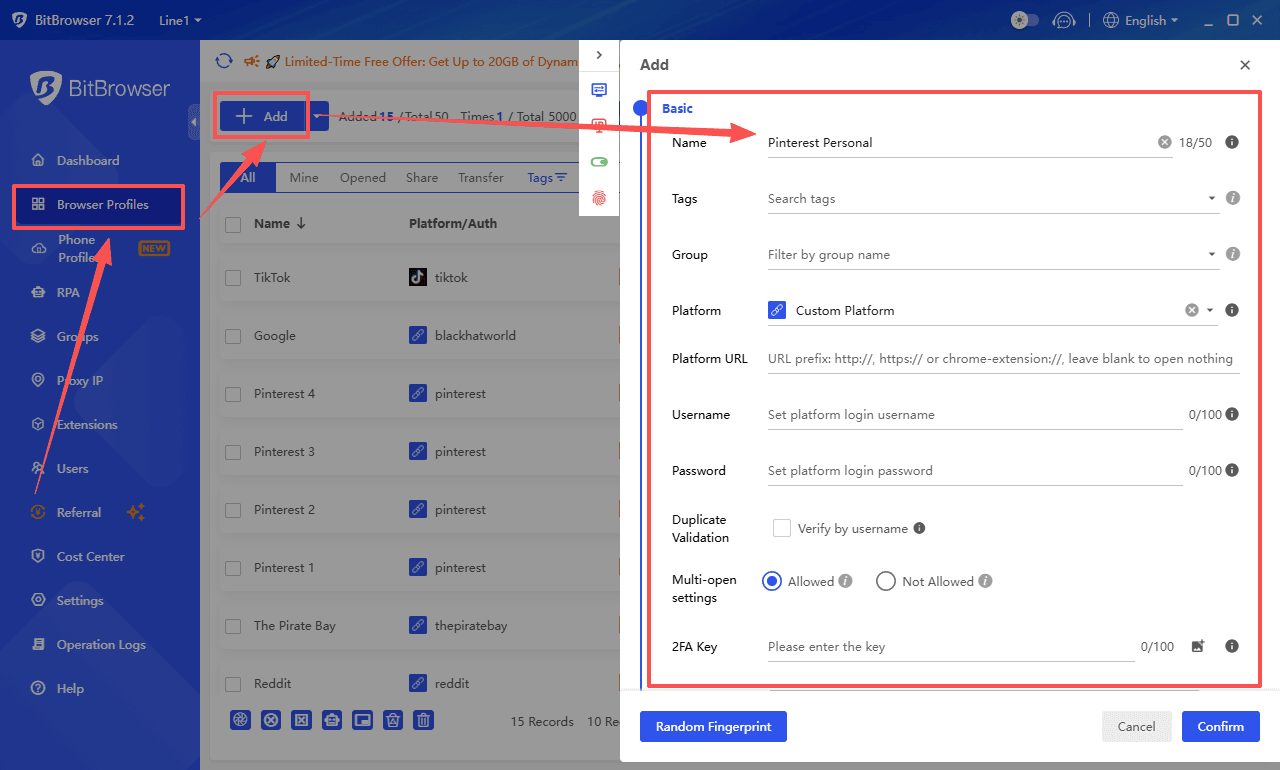
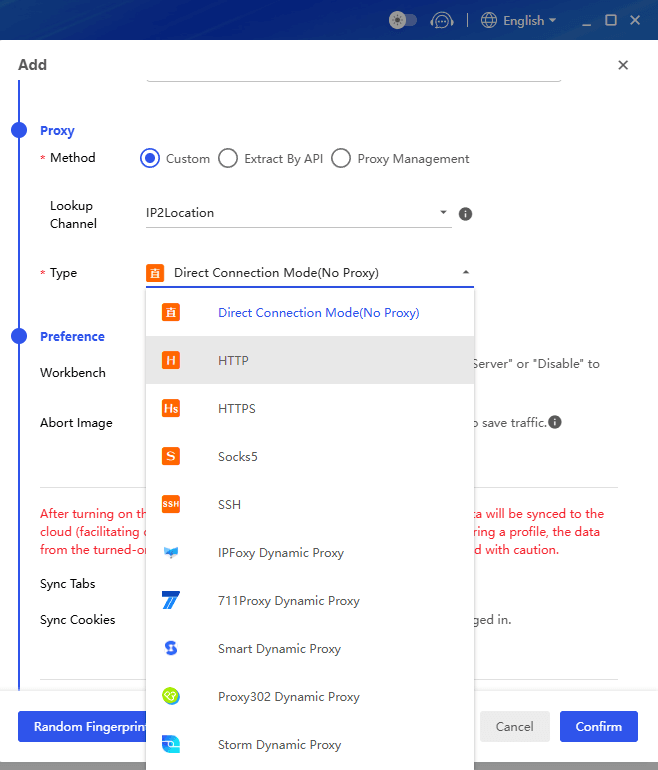
3. Set a proxy if needed (optional) and click "Open" to launch the isolated browser window.
4. Log in to your first Pinterest account inside this isolated window.
5. Repeat steps 2 to 4 for any additional Pinterest accounts you manage.
6. Use any of the downloading methods listed above (Method 2 or Method 3) inside the respective BitBrowser window.
Why Use This Method:
This prevents the platform from cross tracking your activity across different accounts. It ensures that downloading content on one account does not put your other accounts at risk of temporary restrictions. It is an excellent solution for social media managers and content curators who value a clean, separate workflow.
Sign Up
Important Considerations and Legal Guidelines
Before downloading any content from Pinterest, adhere to the following best practices to respect creator rights and maintain a safe digital footprint.
● Personal Use Only: Downloaded videos are intended for offline inspiration, educational reference, or private sharing with colleagues. They should not be reuploaded to other social media platforms as your own content.
● Copyright and Attribution: Do not use downloaded videos for commercial advertising or resale without explicit written permission from the original content owner. If you share a video privately, always credit the original Pinterest pinner.
● Avoid Login Requests: During the download process using online tools, never enter your Pinterest username and password on a third party website. Legitimate downloaders only require the public video link.
● Check Platform Updates: Pinterest Terms of Service and technical backend changes occur periodically. A method that works today may need adjustment next month. Regularly verify that your chosen downloader extension or website is still functional.
By following these seven methods and guidelines, you can effectively build a personal library of Pinterest video content while keeping your accounts secure and respecting the creative community.

 Multi-Account Management
 Prevent Account Association
 Multi-Employee Management
Recommended
See More