Best Anti-Detect Browsers for TikTok Web in 2026: Which One Keeps Your Multi-Account Workflow Safe
 2026.04.24 07:52
 YT.Shi
Managing multiple TikTok Web accounts from a single browser triggers account linking. TikTok collects browser fingerprints, device signals, cookies, and IP data. If several accounts share the same environment, verification loops and account restrictions follow. An anti-detect browser solves this by giving each account a fully isolated digital environment. Every profile looks like a separate computer.
For TikTok Web teams, the right anti-detect browser needs to handle more than fingerprint masking. Daily operations demand fast profile setup, stable proxy binding, automation for repetitive tasks, and team access controls that don't expose passwords.
Key factors for TikTok Web work:
● Whether default fingerprints pass TikTok's detection without manual tuning
● How quickly you can create 10, 50, or 100 profiles and assign proxies
● Built-in automation for login, scrolling, and posting across web sessions
● Team sharing that doesn't require passing raw credentials
● Support for mobile fingerprints or cloud phones, since TikTok is a mobile-first platform
Long-term cost as account numbers scale
Four anti-detect browsers appear consistently in professional discussions: Multilogin, GoLogin, Incogniton, and BitBrowser. Each can isolate accounts. The differences emerge in daily TikTok Web operations.
Top Anti-Detect Browsers for TikTok Web in 2026 Compared
| Feature | Multilogin | GoLogin | Incogniton | BitBrowser |
|---|---|---|---|---|
| Browser engines | Mimic (Chromium) and Stealthfox (Firefox) | Chromium only | Chromium only | Chrome and Firefox dual-core |
| Default fingerprints | Advanced, but complex setup | Customizable, options limited for some devices | Flexible but often needs manual tuning | Ready to use, random fingerprint in one click |
| Proxy integration | Manual setup; built-in proxies on higher plans | Built-in proxy marketplace | Manual configuration | Manual, API, and built-in testing before launch |
| Automation | Selenium, Puppeteer | Selenium, Puppeteer | Synchronizer, Selenium API | Built-in RPA, window synchronizer, Selenium, Puppeteer |
| Team collaboration | Advanced roles (from €79 plan) | Basic sharing | Basic permissions, limited logs | Role-based access, detailed activity logs, batch sharing |
| Mobile support | Desktop only | Desktop only, some mobile fingerprints | Desktop only | Cloud phone for real Android TikTok environments |
| Free plan | 3-day trial for €1.99 (5 profiles) | 7-day trial, 3 profiles free with limited features | 10 profiles free for 2 months, then drops to 3 | 10 profiles permanently free with core features |
| Pricing for 100 profiles | around €79/month | around $79/month | Higher-tier plans required for teams (starts $79.99) | Competitive at scale (starts $10) |
1. BitBrowser
BitBrowser is built for multi-account management at scale. Each browser profile runs as a completely separate device with independent fingerprints, cookies, and local storage. The default fingerprint quality is high enough to pass most detection checks without manual tuning. Creating a profile can be done in a single window, and a one-click "Random Fingerprint" option generates consistent configurations instantly.
Sign Up
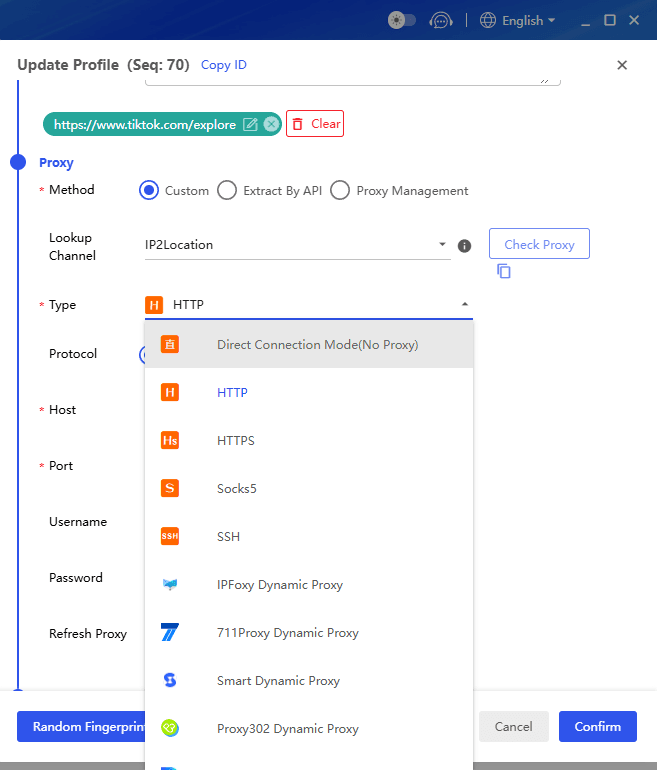
Proxy integration covers HTTP, HTTPS, SOCKS5, and SSH. You can test proxy connections and locations before launching profiles, which prevents failures when running many accounts simultaneously. BitBrowser also connects directly with BitCloudPhone, a cloud phone solution that runs real Android environments. For TikTok, where mobile behavior patterns matter, this extends operations beyond the desktop web interface.
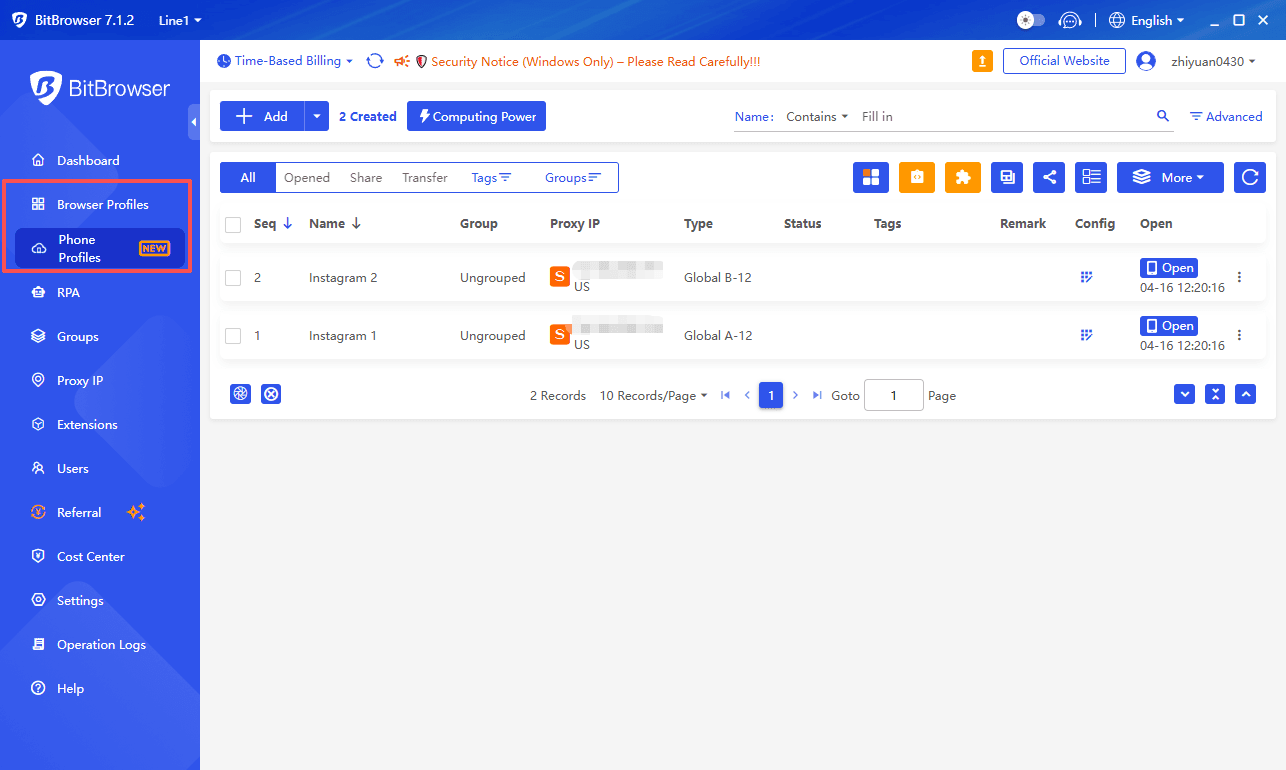
Automation goes deeper than Selenium and Puppeteer support. BitBrowser includes a built-in RPA tool that lets you build visual automation flows. Login, scrolling, posting, and switching accounts can be handled without writing scripts. A window synchronizer mirrors actions from one main window across multiple profiles in real time. For account warmup or repetitive TikTok Web interactions, this eliminates hours of manual work.
Team collaboration is integrated at the core. Roles and permissions can be assigned granularly. Browser profiles can be shared without exposing cookies or raw passwords. Activity logs track who accessed which account and when, which simplifies security audits and client handovers.
Pricing includes a permanently free plan with 10 browser profiles and access to most core features: fingerprint customization, proxy configuration, extensions, and automation tools. Paid plans remain competitive as operations scale to hundreds of profiles.
For TikTok Web: BitBrowser covers the full daily workflow. Profile setup is fast. Automation works without coding. Team management keeps operations secure. Cloud phone support bridges the gap between web and mobile app accounts. The 10 free profiles let you run a real multi-account setup from day one.
2. Multilogin
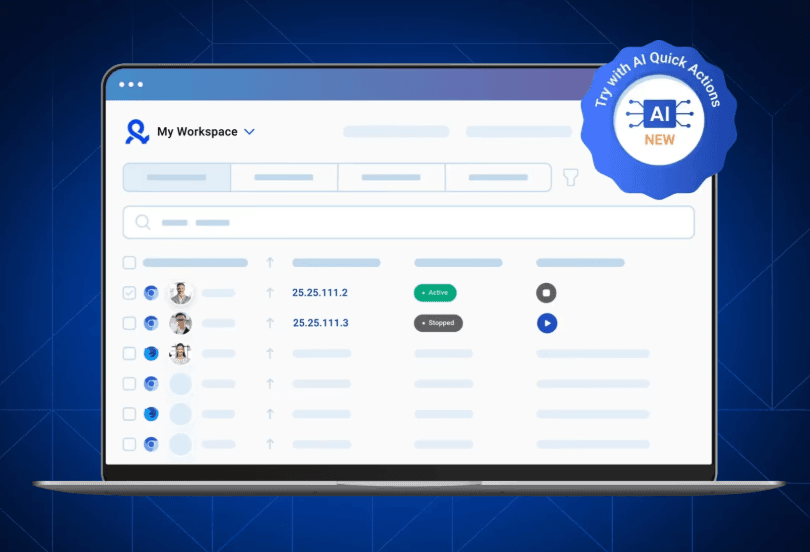
Multilogin built its reputation on stable fingerprint simulation over more than a decade. Agencies and affiliate networks often choose it when stability is the absolute priority. It offers two browser engines, Mimic and Stealthfox, which helps when platforms behave differently across Chromium and Firefox.
The fingerprint technology attempts to simulate realistic browser behavior, including graphics rendering, hardware signatures, and fonts. However, setting up profiles requires serious time investment. New users face a steep learning curve when configuring proxies, profiles, and automation workflows. Compatibility issues between its web interface and desktop agent also cause glitches on some devices.
Team collaboration is available but only from the €79 plan upward, with two roles included. For a TikTok Web operator managing multiple accounts, the cost adds up quickly. Automation relies on Selenium and Puppeteer, with no built-in no-code tools. This forces technical workarounds for routine tasks like daily login or comment monitoring.
For TikTok Web: Multilogin offers strong isolation but at a high price and with a complex setup. Teams managing many accounts may find the daily workflow slower than necessary.
3. GoLogin
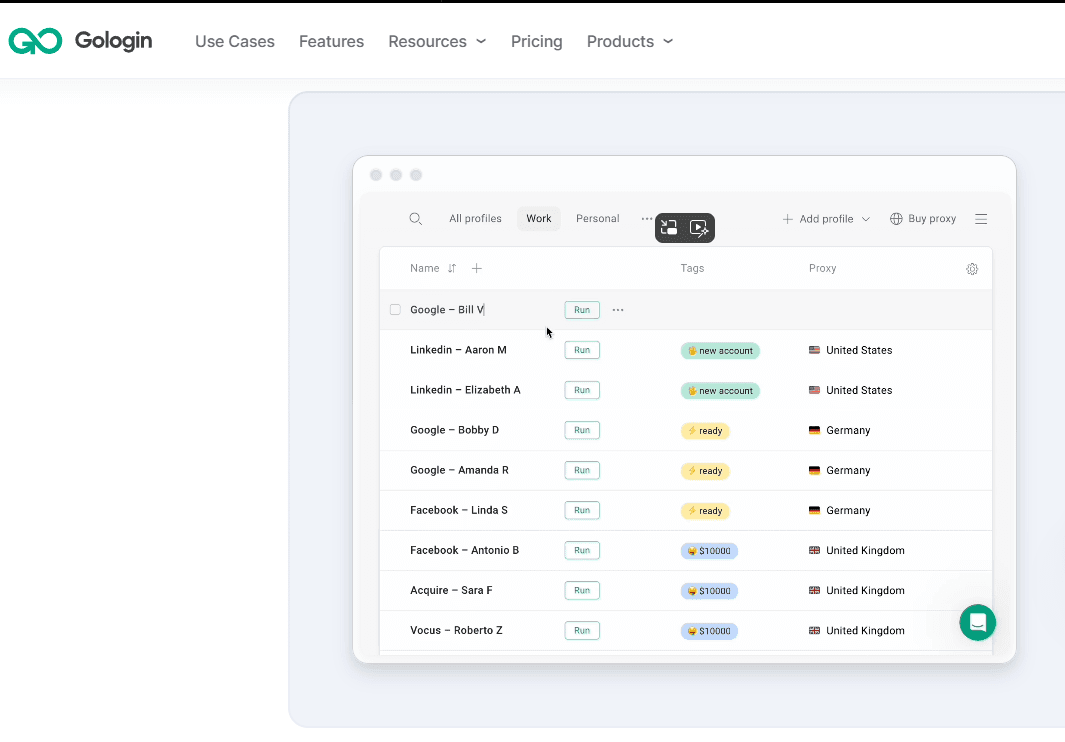
GoLogin entered the market with a focus on accessibility. The interface is cleaner and requires less configuration time compared to older tools. A built-in proxy marketplace lets users purchase and assign proxies directly inside the dashboard, removing some technical friction.
Fingerprint customization is flexible. Users can choose operating systems, hardware profiles, and browser settings. Mobile fingerprints are supported, which matters for TikTok, but the options are somewhat limited and may still reflect the host device's OS.
GoLogin covers the basics well for small teams and solo affiliate marketers. Scaling up reveals limits. The platform only provides a Chromium browser, offers no built-in no-code automation, and customer support and documentation are smaller compared to more mature platforms. Performance can dip when running many profiles simultaneously.
Team sharing exists but the permission system is basic. The free plan gives 3 profiles with limited features, while paid plans start at $49 per month. At 100 profiles, pricing aligns with competitors, but high-quality proxies add separate costs.
For TikTok Web: GoLogin suits individuals or small teams testing the waters. For daily posting, multi-account engagement, and automated workflows across dozens of profiles, the tool feels lean.
You can see the differences between Multilogin and Gologin.
4. Incogniton
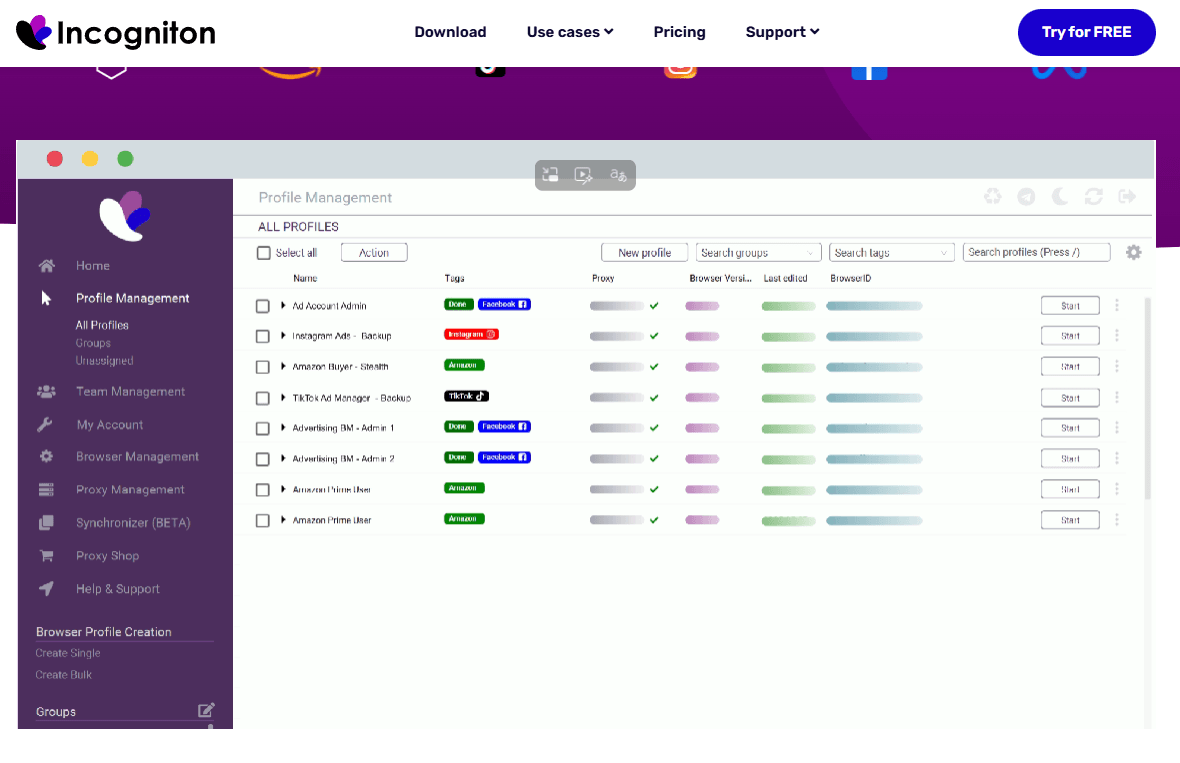
Incogniton presents a structured dashboard with many configuration options right at the start. Users can control GEO, WebGL, timezone, proxy settings, and more. This flexibility appeals to technical users, but it also means manual work piles up fast. Default fingerprints may not pass stricter checks without fine-tuning.
Automation comes in two forms: a synchronizer for recording and replaying actions, and API support through Selenium. The synchronizer handles simple repetition, but there is no visual RPA builder. For complex TikTok Web workflows like scheduled posting across accounts, you will either write scripts or accept manual clicking.
Incogniton's free plan offers 10 profiles for two months, which then drops to 3. Team collaboration and advanced features start at a higher tier ($79.99 per month). Mobile device simulation is absent. Activity logs and batch management tools remain basic compared to platforms built for team operations.
A past security incident involving user data has been reported and officially acknowledged, which some operators consider when handling sensitive accounts.
For TikTok Web: Incogniton works for small, technically comfortable setups. The time spent tuning profiles and building automation from scratch grows with each added account.
You can see the differences between BitBrowser and Incogniton.
Which One Performs Best for TikTok Web
For personal use with 3 to 5 accounts, BitBrowser's free plan and ready-to-use fingerprints save setup time and cost. Incogniton offers deep configuration but demands more technical effort and its free tier shrinks after two months.
For small teams managing 10 to 20 TikTok Web profiles, GoLogin provides a gentler learning curve. BitBrowser adds automation and team controls without pushing the price into enterprise territory.
For agencies and brands running dozens or hundreds of accounts, the choice narrows. Multilogin delivers stable fingerprints at a high cost and steep learning curve. BitBrowser matches the fingerprint isolation while adding no-code automation, cloud phones for mobile, and role-based team controls. The workflow stays consistent as the account list grows.
Across all TikTok Web scenarios, BitBrowser balances isolation strength, daily operating speed, and long-term cost most effectively.
Sign Up
Quick Start: BitBrowser for TikTok Web
1. Download and install BitBrowser.
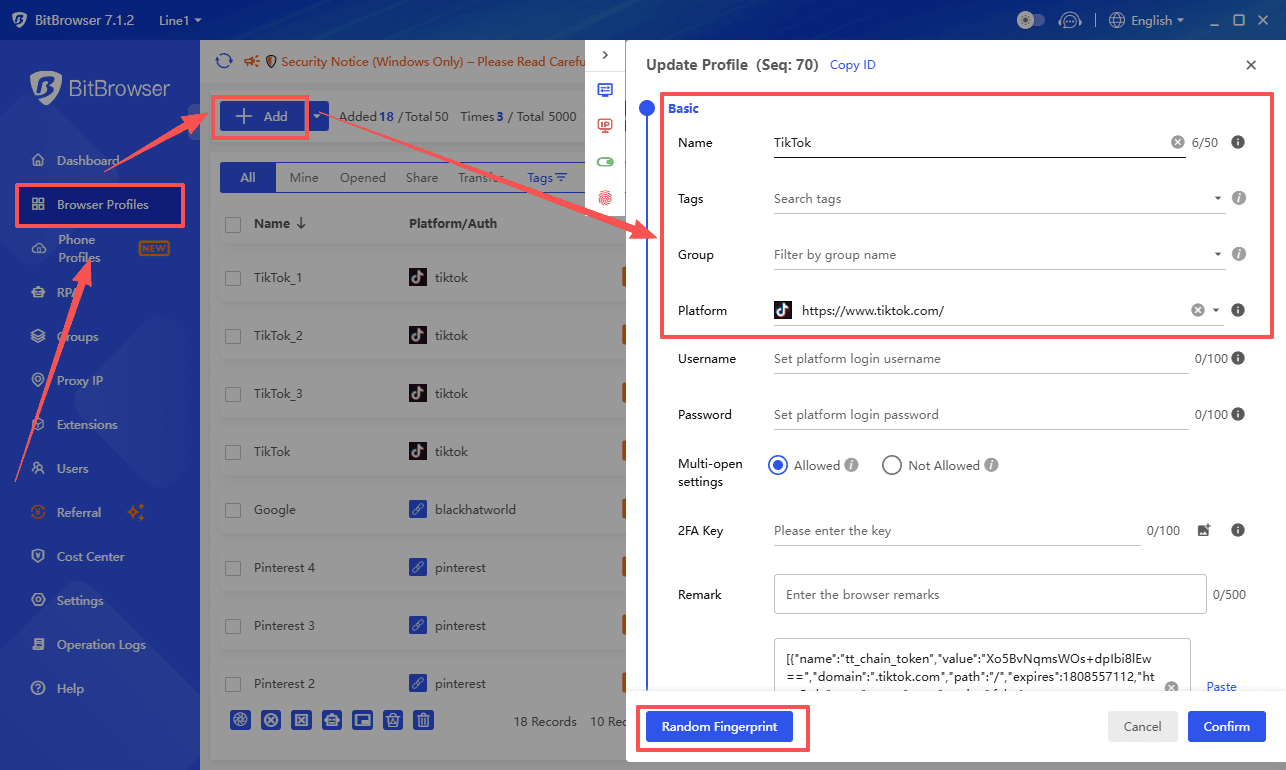
2. Create a new browser profile for each TikTok Web account. Name them by account handle or purpose.
3. Click "Random Fingerprint" to generate a unique environment, or customize parameters manually.
4. Assign a proxy matching the account's registered region. Test the connection inside the profile settings.
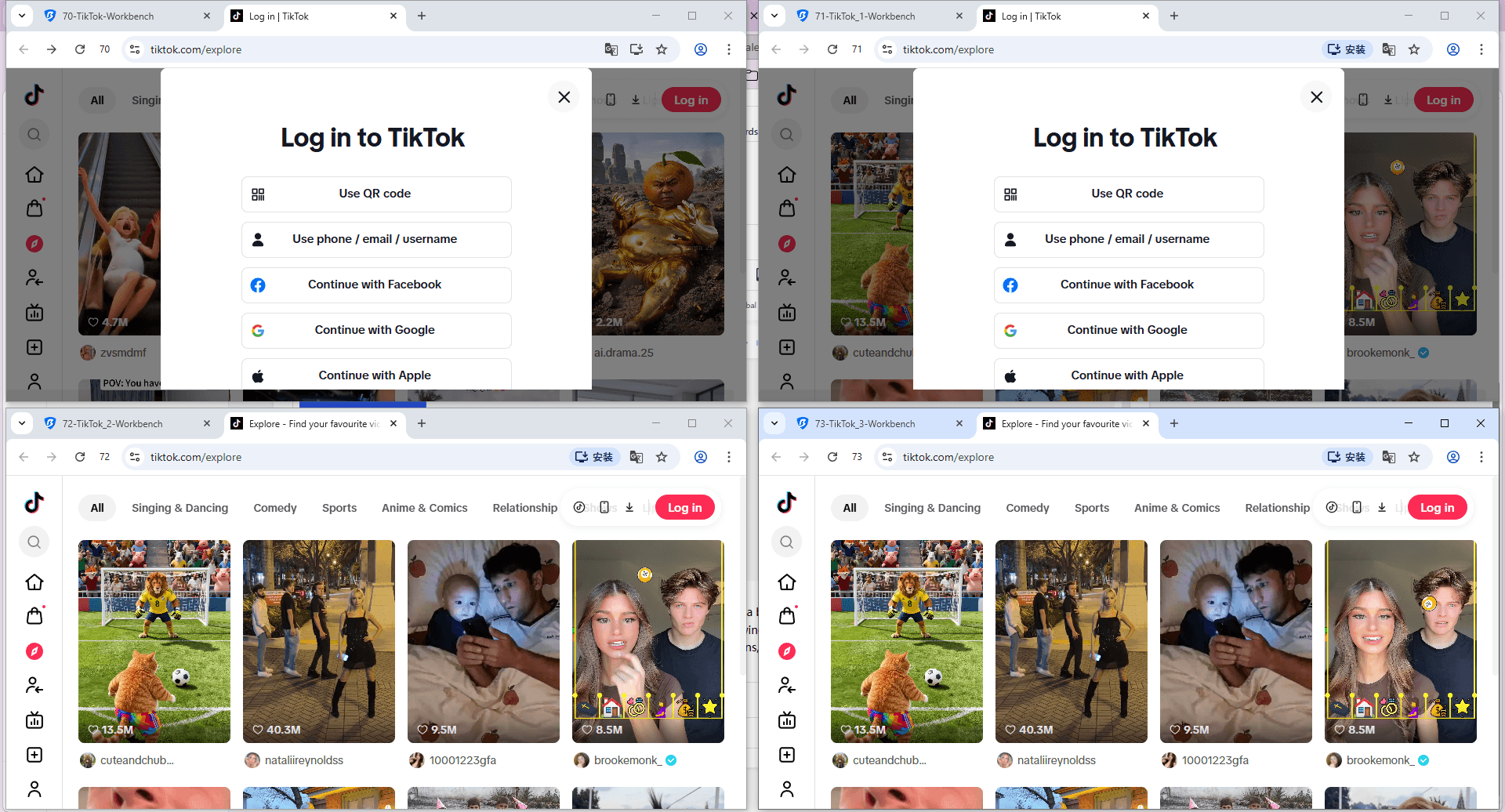
5. Open the profile and navigate to tiktok.com. Log in using email, phone, or QR code.
6. For teams, add members and assign permissions without sharing login credentials.
7. Use the RPA recorder or synchronizer to automate routine actions like daily login, feed scrolling, or comment replies.
Frequently Asked Questions
Can I use an anti-detect browser for TikTok Web for free?
BitBrowser provides 10 browser profiles permanently free with core features included. Incogniton offers 10 profiles free for two months, then drops to 3. GoLogin's free tier gives 3 profiles with limited features. Multilogin has no permanent free plan.
Will TikTok detect BitBrowser fingerprints?
BitBrowser generates fingerprints that simulate real device environments. Each isolated profile stores its own cookies, cache, and local data. When combined with a consistent proxy, the profile appears as a natural, separate device.
How many TikTok Web accounts can I run on one anti-detect browser?
The tool itself imposes no hard account limit. BitBrowser allows unlimited profiles based on your plan. Practical limits depend on your computer's resources and the proxies assigned. Operators routinely manage dozens to hundreds of profiles.
Is using an anti-detect browser on TikTok Web against the rules?
Anti-detect browsers are legitimate privacy and productivity tools used across industries. They do not automate policy violations. Always follow TikTok's terms of service for content and account behavior.
What about mobile app accounts alongside TikTok Web?
Incogniton, GoLogin, and Multilogin are desktop focused. BitBrowser integrates with BitCloudPhone, allowing you to run real Android environments and manage mobile app accounts from the same dashboard. This is helpful when mobile behavior signals matter for account trust.

 Multi-Account Management
 Prevent Account Association
 Multi-Employee Management
Recommended
See More